
Backtest in MT5 using tick data
Running Your First MT5 Backtest with Tick Data Suite
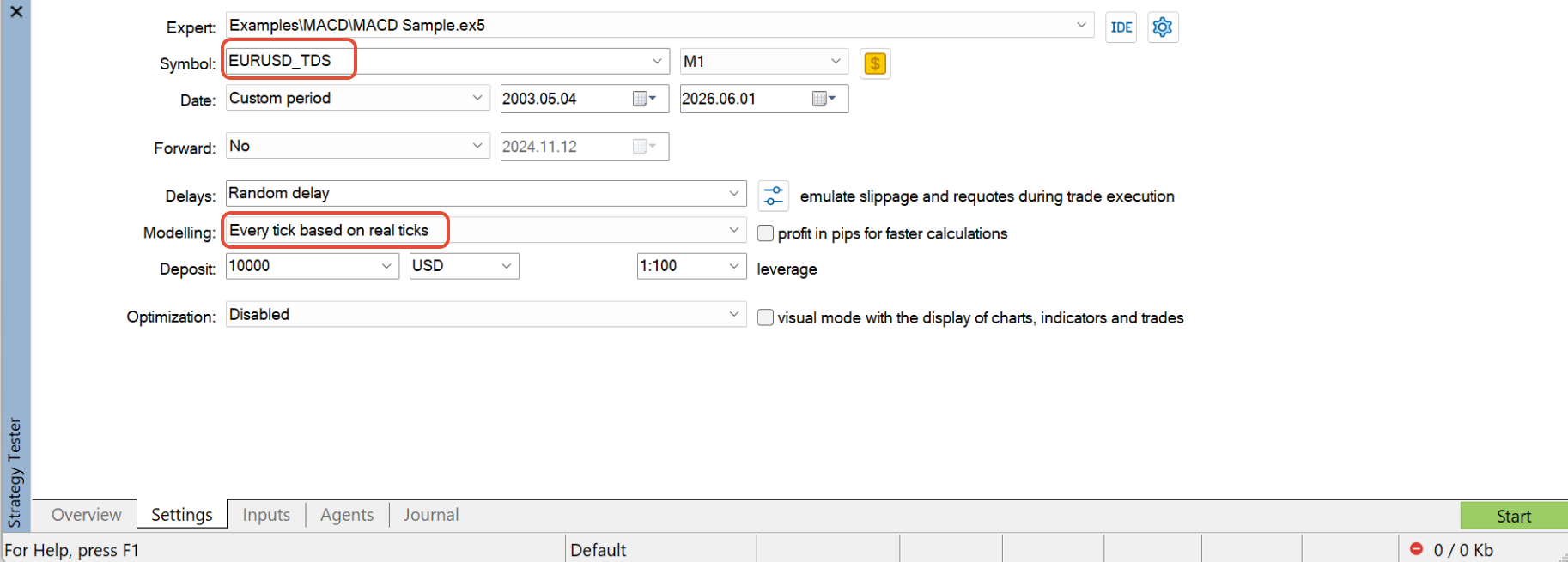
Once the setup steps are done, running a tick-data backtest in MT5 is almost the same as running any other Strategy Tester session — you just need to remember to pick the _TDS version of the symbol.
Prerequisites
- Custom symbols created and linked with tick data sources (how →)
- Update MT5 data already clicked for those symbols.
Start MT5
Once MT5 is open, verify the Tick Data Suite is active:
Configure and run the backtest
Realistic conditions
For a realistic backtest, match your broker's live trading conditions:
| Setting | What to set |
|---|---|
| Commission | Match your broker's commission per lot (round-turn or per-side, whichever your broker uses). |
| Server ping or Random delay | Simulates execution latency. Leaving this at zero gives unrealistically optimistic fills. |
| Spread | Tick Data Suite provides variable spread automatically from the historical tick stream. |
Reviewing the results
When the backtest finishes, open the Backtest tab and make sure that History Quality is 100%. This is your confirmation the backtest used tick data.
Return to: MT5 Quick Start